Using Julia to create, solve, and visualize Pendulum motion
In this notebook, with the help of a Microsoft copilot agent, I go through three steps:
define kinetic and potential energy for the Lagrangian
create an equation of motion
solve and visualize the differential equation
The kinetic and potential energy is determined from the simple pendulum: a point mass attached to a constant-length support.
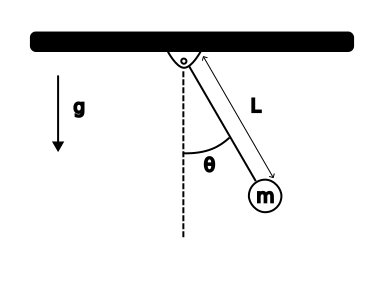
First step is to import packages and define the Lagrangian,
$$T = T - V$$
where
$$T = \frac{1}{2}mv^2 = \frac{1}{2}mL^2\dot{\theta}^2$$
and
$$V = mgL(1- \cos\theta)$$
using Symbolics, Plots, DifferentialEquations, Latexify, OrdinaryDiffEqbegin
@variables t m L g
@variables θ(t) # θ is a function of time
D = Differential(t) # time derivative operator
# Define kinetic and potential energy
T = (1//2) * m * L^2 * (D(θ))^2
V = m * g * L * (1 - cos(θ))
# Lagrangian
Lag = T - V
end$$\begin{equation} - L ~ g ~ m ~ \left( 1 - \cos\left( \theta\left( t \right) \right) \right) + \frac{1}{2} ~ \left( \frac{\mathrm{d} ~ \theta\left( t \right)}{\mathrm{d}t} \right)^{2} ~ L^{2} ~ m \end{equation}$$
Create the equation of motion
Next, since the Lagrangian, Lag is a symbolic math term, I use Symbolics to find the partial and full derivatives for the Lagrangian equation of motion,
$$\frac{d}{dt}\left(\frac{\partial L}{\partial \dot{\theta}}\right) - \frac{\partial L}{\partial \theta} =\frac{\delta L}{\delta \theta}$$
begin
dL_dθdot = Symbolics.derivative(Lag, D(θ))
dL_dθ    = Symbolics.derivative(Lag, θ)

EL_equation = expand_derivatives(D(dL_dθdot) - dL_dθ)
end
$$\begin{equation} L^{2} ~ m ~ \frac{\mathrm{d}^{2} ~ \theta\left( t \right)}{\mathrm{d}t^{2}} + L ~ g ~ m ~ \sin\left( \theta\left( t \right) \right) \end{equation}$$
Lagrange equation of motion
The equation of motion for dynamic systems is usually,
$$\ddot{q} = f(q,~\dot{q},~t)$$
or in this case,
$$\ddot{\theta} = f(\theta)$$
I create the ode_symbolic variable that solves for the acceleration term, \(\ddot{\theta}\).
Then, I use the build_function to create a Julia function, θ_double_dot that calculates the acceleration given inputs for θ, D(θ), g, L: angle, angular velocity, gravity, and length, respectively.
ode_symbolic = solve_for(EL_equation, D(D(θ)))# isolate θ̈ symbolically$$\begin{equation} \frac{ - g ~ \sin\left( \theta\left( t \right) \right)}{L} \end{equation}$$
begin
#θ̈_expr = ode_symbolic[D(D(θ))]# extract θ̈(θ)

θ_double_dot = build_function(ode_symbolic, θ, D(θ), g, L; expression=Val(false))
end
RuntimeGeneratedFunction(#=in Symbolics=#, #=using Symbolics=#, :((var"θ(t)", var"Differential(t, 1)(θ(t))", g, L)->#= /home/ryan/.julia/packages/Symbolics/iJWhW/src/build_function.jl:143 =# @inbounds(begin
#= /home/ryan/.julia/packages/Symbolics/iJWhW/src/build_function.jl:143 =#
begin
(/)((*)((*)(-1, g), NaNMath.sin(var"θ(t)")), L)
end
end)))
Visualize the Results
Now, the cool result. I use the Plots package and the @gif command to
plot the angle and angular velocity vs time
create an animation of the angle+velocity synced to the motion of the pendulum
First, ODEProblem solves the initial value problem. Then, @gif uses a for-loop to cycle through the values and positions of the pendulum at each time step. The result is a repeating animation of the positions and velocities all in sync.
begin

# This block defines the numerical pendulum ODE and solves it
# θ_state = [θ; θ̇]

function pendulum_ode!(dstate, state, p, t)
    position_angle   = state[1]
    velocity_angle   = state[2]

    g, L = p
    dstate[1] = velocity_angle
    dstate[2] = θ_double_dot(position_angle, velocity_angle, g, L)
end

initial_state = [30*pi/180, 0.0]   # 30-deg initial displacement
parameters    = (9.81, 1.0) # g, L
time_span     = (0.0, 6.0)

prob = ODEProblem(pendulum_ode!, initial_state, time_span, parameters)
sol = solve(prob, reltol = 0.000001)
end
retcode: Success
Interpolation: 3rd order Hermite
t: 80-element Vector{Float64}:
0.0
0.01958732806093637
0.045907695312376415
0.07777429916312974
0.11610384213047867
0.16029222663289078
0.21049952719421197
⋮
5.648037892040804
5.72946289472896
5.812955097491852
5.8986107797233975
5.985401295638291
6.0
u: 80-element Vector{Vector{Float64}}:
[0.5235987755982988, 0.0]
[0.5226580966394426, -0.09602365105801824]
[0.518437803431498, -0.22450528737211825]
[0.5088275195092176, -0.3782156890823639]
[0.49085431108219757, -0.558621080554812]
[0.46173115219672983, -0.757645334365266]
[0.4183346341714845, -0.9678249290395702]
⋮
[0.05714092968946699, 1.6113835603737818]
[0.18508903414797978, 1.5144195436504582]
[0.30387089475103657, 1.3151792070504844]
[0.40454256101490055, 1.0222044910479502]
[0.4778068481069736, 0.6566941458057738]
[0.4869101507317937, 0.5902517902861357]
begin
# Animation with three panels: θ(t), ω(t), and pendulum motion
# Packages referenced: Plots.jl, DifferentialEquations.jl
gravity_value, length_pendulum = parameters
number_frames = 150; origin_pivot = (0.0, 0.0)
time_values = range(time_span[1], time_span[2], length=number_frames)

@gif for time_value in time_values
    current_state = sol(time_value)
    angle_current, speed_current = current_state[1], current_state[2]

    angle_plot = plot(sol.t, sol[1,:], xlabel="time (s)", ylabel="θ (rad)", title="Angle vs Time", legend=false)
    scatter!(angle_plot, [time_value], [angle_current])

    speed_plot = plot(sol.t, sol[2,:], xlabel="time (s)", ylabel="ω (rad/s)", title="Angular Speed vs Time", legend=false)
    scatter!(speed_plot, [time_value], [speed_current])

    bob_position_x = length_pendulum * sin(angle_current)
    bob_position_y = -length_pendulum * cos(angle_current)

    pendulum_plot = plot(xlim=(-1.2length_pendulum, 1.2length_pendulum), ylim=(-1.2length_pendulum, 0.2length_pendulum),
                         aspect_ratio=:equal, xlabel="x (m)", ylabel="y (m)", title="Pendulum Motion", legend=false)
    plot!(pendulum_plot, [origin_pivot[1], bob_position_x], [origin_pivot[2], bob_position_y], lw=3)
    scatter!(pendulum_plot, [bob_position_x], [bob_position_y], ms=8)

    plot(angle_plot, speed_plot, pendulum_plot, layout=@layout([a; b; c]), size=(700,900))
end every 2
end
Built with Julia 1.12.4 and
DifferentialEquations 7.17.0Latexify 0.16.10
OrdinaryDiffEq 6.108.0
Plots 1.41.6
Symbolics 7.13.0
To run this tutorial locally, download this file and open it with Pluto.jl.